


MoBill Budget and Reminder
4.01.56K Reviews
App Specs
- Version
- 5.3.1
- Updated On
- License
- Free
- Downloads
- 500,000+
- Developer
- MoBill Apps
- Categories
- Finance
- Platform
- Android
Screenshots
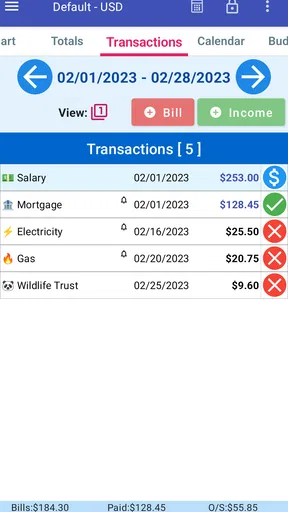
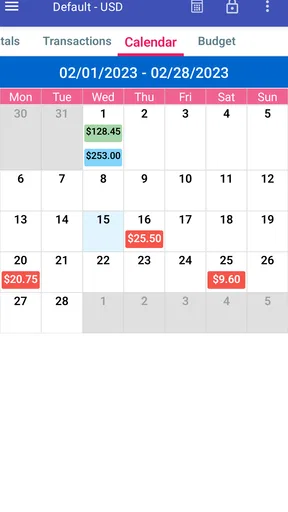
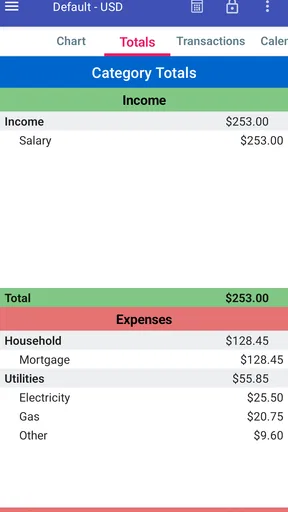
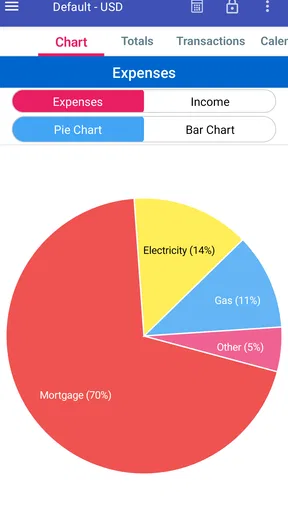
 Analysis by AppCompare
I spent time with MoBill Budget and Reminder as a personal finance app rather than treating it like a full banking service. That distinction matters. Its job is to help me keep an eye on planned spending, recurring obligations, and the shape of my budget, not to replace every financial tool on my phone. The experience is most useful when I want a simple place to record what is coming up and check whether my everyday choices still fit the plan.
MoBill Apps has kept the app available since February 28, 2011, and its current version is 5.3.1. It is free to install, with optional in-app purchases ranging from $2.50 to $10.99 per item. The audience is broad because the content rating is Everyone, and the app sits in the finance category rather than trying to entertain or overwhelm me with a large financial dashboard.
My overall impression is practical: this is a focused budgeting companion for someone willing to enter and review information regularly. It is not the best match for a person who expects automatic account connections, advanced investment analysis, or a highly polished financial command center. If your main goal is simply to remember bills and keep spending decisions visible, however, its narrower purpose can be an advantage.
How MoBill Budget and Reminder feels in everyday use
I find the everyday value of MoBill Budget and Reminder less in tracking everything and more in creating a small pause before a spending decision. This section looks at how a quick budget check can fit around ordinary routines, then turns to the practical choices that make that habit easier to keep.
Speed expectations when checking a budget
The app’s most convincing performance quality is that its purpose is easy to understand. I can open it with a specific question in mind: what needs attention, how much room is left in my plan, or whether an upcoming payment will make the next few days tighter. That focused workflow feels more efficient than opening a general banking app and searching through transactions, messages, and account screens.
For ordinary personal use, I would expect the app to feel light because the central task is organizing budget information rather than processing a large visual feed. That does not mean every screen will feel identical on every phone, but the design goal is clear enough to support quick checks. I especially like the idea of using it before making a nonessential purchase, when a short review is more useful than a long financial session.
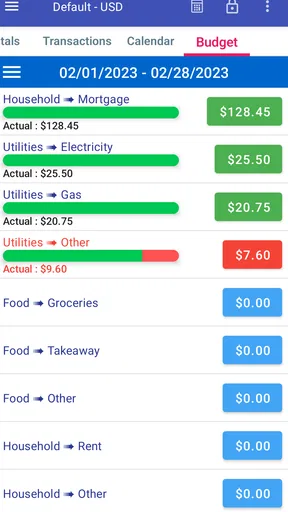
A realistic example is my weekly grocery routine. Before leaving home, I can review the amount I have set aside for food and consider any bills that are due soon. If the grocery trip needs to be smaller than usual, I would rather discover that before reaching the checkout. The value here is not a magical prediction; it is the small pause the app creates between wanting something and committing money to it.
Worth Reading Before You Choose

EA SPORTS FC Mobile 26 Is a Bigger Football Game, but It Takes Time

Flipboard Shows What News Apps Must Do Beyond the Feed

Switching to Android Auto Means Rethinking Your Driving Routine

Google Calendar Makes a Crowded Week Easier to Manage

Ludo King Makes the Most of the Minutes Between Plans

Baby Panda World Brings Quick Play to Modern Phones, but Its Game Library Feels Busy
That speed also depends on how carefully I maintain the information. A budget app cannot give me a meaningful answer if I leave old amounts untouched or forget a regular expense. MoBill Budget and Reminder works best as a quick reference after I have done the initial organizing. It is less useful as a one-time download that I never revisit.
What happens during heavier use
The demanding moments are likely to come from my own financial routine rather than from complicated graphics. A person with several recurring bills, multiple spending categories, irregular income, and frequent corrections will ask more of the app than someone tracking a few monthly commitments. The more detailed my setup becomes, the more important it is to use consistent names and amounts so the budget remains readable.
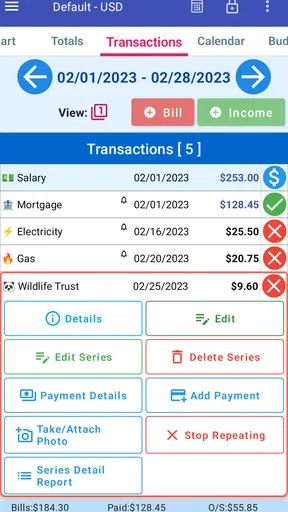
One non-obvious strength of a focused tool is that it can encourage separation between planning and checking. I can first record expected obligations, then return later to compare my real choices with that plan. That two-step habit is more useful than entering every expense randomly because it turns the app into a decision aid. I would set up the recurring items first, then use the remaining budget as a guide for flexible spending.
There is a trade-off, though. Manual organization takes discipline. Someone who wants a service to pull transactions automatically from financial accounts may find this workflow too hands-on. In that situation, a bank app or a dedicated synchronization-based budgeting service may be more convenient, even if it offers a busier interface. MoBill’s appeal is strongest when I prefer direct control over what I record.
Another practical tip is to avoid creating overly narrow categories at the beginning. If I split every type of purchase into its own small group, the budget can become harder to review during a busy week. I would start with categories that answer real decisions—food, transport, household needs, and discretionary spending—then add detail only when it helps me change a habit. This keeps the app’s quick-check role intact.
Reliability and recovering from mistakes
Reliability in a finance app is not only about whether it opens. It is also about whether I can understand the current plan after an amount changes, a bill moves, or I enter something incorrectly. A useful budgeting routine needs room for correction because real life rarely follows the original schedule perfectly.
My advice is to treat the first setup as a draft. Enter the obligations I know, review the resulting picture, and then adjust anything that makes the plan unrealistic. This is a better approach than trying to create a perfect budget in one sitting. It also makes recovery less stressful: if an amount is wrong, I can correct the plan rather than abandoning the whole system.
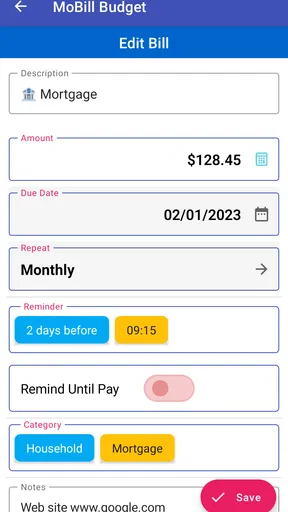
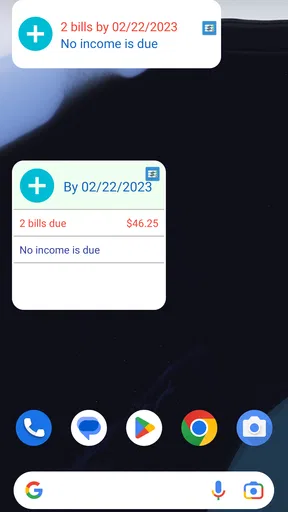
The reminder angle is particularly useful for people whose problem is timing rather than a lack of income. A forgotten renewal or regular payment can disrupt an otherwise reasonable month. Keeping those commitments visible gives me a chance to prepare for them. I would still check important payments through the relevant provider, but the app can act as a personal prompt so those dates do not live only in my memory.
There is an important limitation to understand. A reminder is only valuable if I respond to it and keep the underlying information current. If a payment date changes and I do not update my plan, the app may still reflect an old expectation. That is not a reason to dismiss it; it is a reason to use it as a planning aid rather than as an unquestionable financial authority.
For recovery after a mistake, I would make changes deliberately and review the surrounding entries afterward. Correcting one amount can affect how I interpret the rest of the budget, so a quick second look prevents a small entry error from turning into a misleading conclusion. This habit is especially important for anyone using the app to manage a tight monthly margin.
Device constraints and the right audience
The app requires Android 8.0 or later, which makes the operating-system requirement relevant before installation. On a compatible device, the experience should be judged mainly by clarity and maintenance rather than by demanding media performance. I would not choose a finance app based on graphics, but I would choose one that lets me review information without unnecessary distraction.
Resource demands are difficult to separate from the phone itself and the amount of information I keep. A small personal budget is a different workload from a long history of detailed entries. My practical approach would be to keep the structure tidy, remove or revise items that no longer represent my life, and avoid using the app as an archive for every financial detail I have ever recorded.
The app is a good candidate for a secondary device or an older compatible phone if I want a dedicated budgeting screen, provided that device is secure and convenient to access. I would be more cautious about relying on it as my only financial record without a separate personal backup routine. Finance information deserves care, and a budgeting app should complement sensible record-keeping rather than become the sole place where important details exist.
Because it is free to install, MoBill Budget and Reminder is easy to try without committing money at the start. The optional purchases may suit users who want additional paid functionality, but I would first test whether the basic workflow fits my habits. A free starting point is useful here because the real question is not whether the app looks appealing for a few minutes; it is whether I will actually return to it before spending and before bills are due.
Who will benefit most from the workflow
I would recommend it to someone who wants a straightforward personal budget and prefers entering information intentionally. It can suit a student learning to manage regular expenses, a household member responsible for remembering recurring payments, or anyone who keeps losing track of flexible spending after fixed bills are covered.
It can also help a person who dislikes the feeling of handing every financial detail to an automated service. Manual entry is extra work, but it can make me more aware of each decision. When I type in a planned expense, I am forced to acknowledge it. That small amount of friction can be useful for impulse spending because the budget becomes something I actively consult rather than a background number I never see.
I would skip it if my priority is automatic transaction importing, shared household collaboration, sophisticated reports, investment tracking, or a single screen combining multiple bank accounts. Those needs point toward a broader financial platform. I would also avoid choosing it solely because I want reminders to replace all other payment checks. A reminder can support a routine, but it should not be the only safeguard for important obligations.
Compared with a spreadsheet, the app is more approachable for quick personal checks because it is designed around budgeting rather than cells and formulas. A spreadsheet remains better for custom calculations, long-term analysis, and complete control over structure. Compared with a banking app, MoBill can offer a more intentional planning mindset, while the bank app is naturally better for confirming what actually happened in an account. I see them as complementary rather than interchangeable.
Three habits that make it more useful
Set up fixed commitments before flexible categories. This shows me what money is already spoken for and prevents an attractive discretionary budget from hiding upcoming obligations.
Use a weekly review instead of waiting for a financial crisis. A short check can reveal that a category is running ahead of plan while there is still time to adjust ordinary purchases.
Record changes as soon as they become real. If a bill changes or a planned expense disappears, updating the budget promptly keeps later decisions based on the current situation rather than on an outdated estimate.
These habits expose a useful trade-off: the app can improve awareness precisely because it asks me to participate. People who enjoy automatic systems may see that as friction, while people who want a deliberate routine may see it as accountability. Neither approach is universally better. The right choice depends on whether I want convenience first or visibility first.
Stability expectations and practical boundaries
MoBill Apps has built a long-running finance product, and the current release is version 5.3.1. The app has an average rating of 4.0 from around 3.8 thousand ratings, with roughly 1.6 thousand written reviews and more than 500 thousand installs. Those figures suggest that it has found a real audience, while the rating also reminds me to keep expectations balanced rather than assuming it will suit every budgeting style.
I would judge stability by whether the app supports a repeatable routine: open it, understand the current plan, make a careful update, and return later without confusion. When an app is used for finances, predictable organization matters more to me than a long list of extra tools. The narrower the task, the easier it is for me to notice when the workflow genuinely helps or when it starts getting in the way.
For important financial decisions, I would still verify amounts and payment status through the original source. This is especially sensible when a bill has changed, a payment is urgent, or the budget is being used to make a major commitment. MoBill can organize my expectations, but organization and confirmation are different jobs.
My performance verdict
MoBill Budget and Reminder is best understood as a focused, hands-on budgeting assistant. I like it for the quiet moments when I need to know what is planned, what is coming up, and how much freedom remains for ordinary spending. Its likely strength is not flashy presentation; it is the possibility of creating a repeatable check-in habit without turning personal finance into a complicated project.
Its limitations are equally clear. Manual upkeep may frustrate people who expect automatic data collection, and anyone seeking advanced financial analysis will probably outgrow its focused approach. The app also cannot make a budget realistic by itself. I have to enter sensible information, revise it when circumstances change, and act on what I see.
Still, for a free finance app from MoBill Apps with an Everyone rating and support for Android 8.0 or later, it is worth considering if your needs are centered on personal budgeting and reminders. I would start with a small, honest setup, use it through a normal spending cycle, and judge it by one question: does opening it help me make a better decision before money leaves my hands? If the answer is yes, its simplicity becomes a genuine benefit rather than a missing feature.
Pros
- Simple budget tracking for everyday spending.
- Useful reminders help prevent missed bill payments.
- Clear overview of upcoming financial obligations.
- Suitable for users who prefer a lightweight finance app.
- Can encourage more consistent saving and expense awareness.
Cons
- May lack advanced reports and investment tracking tools.
- Manual expense entry can become time-consuming.
- Limited features may not suit complex household budgets.
- Reminder usefulness depends on accurate user-entered dates.
- Some features may require payment or contain advertising.
FAQs for MoBill Budget and Reminder
What is MoBill Budget and Reminder used for?
MoBill Budget and Reminder is designed to help you organize personal finances by tracking bills, recurring payments, budgets, and important due dates in one place. After setting up your regular expenses, the app can give you a clearer view of upcoming obligations and help reduce the risk of forgetting payments. It is mainly a planning and monitoring tool rather than a banking service.
Can MoBill Budget and Reminder send reminders for upcoming bills?
Yes, reminders are one of the app’s main purposes. You can add bills with their amounts, payment schedules, and due dates, then use notifications to stay aware of upcoming payments. The exact timing and reliability of alerts may depend on your device’s notification permissions, battery-saving settings, and the reminder options available in your installed version, so these should be checked after installation.
Does the app connect directly to my bank account?
MoBill Budget and Reminder is generally intended for manually managing bills and budgets rather than replacing your bank’s mobile application. Before downloading, users should confirm whether their particular version supports bank synchronization or imports, because features can vary by platform and release. If no connection is available, you will need to enter transactions, balances, and recurring expenses yourself.
Is MoBill Budget and Reminder suitable for managing a household budget?
It can be useful for individuals and households that want a straightforward overview of recurring bills, spending plans, and payment deadlines. You can use it to separate regular obligations from flexible expenses and review whether your planned budget is realistic. However, families should decide how they will share information, since collaboration, multiple-user access, or cloud synchronization may depend on the version and device being used.
Is my financial information safe when using MoBill Budget and Reminder?
You should review the app’s current privacy policy, permissions, storage method, and developer information before entering sensitive financial details. Budget apps may store data locally, online, or through optional backup services, and their practices can change with updates. Avoid entering bank passwords, card security codes, or other credentials unless the app clearly explains secure handling and you are comfortable with its privacy terms.


